Name Slip design by Ms Word
Project : Name Slip Design
Project Thumbnail
📘 What is MS Word?
Microsoft Word is a word processing application used to create, edit, format, and share text-based documents like letters, reports, resumes, and more. It offers tools for styling, layout design, and collaboration.
🧩 Word Interface Basics
Document: The entire Word file (.docx).
Ribbon: The toolbar at the top containing tabs like Home, Insert, and Layout.
Cursor: The blinking line showing where text will appear.
Paragraph: A block of text ending with the Enter key.
Page: The virtual sheet where you type content.
✍️ Typing and Editing Text
Click anywhere and start typing.
Press Enter for a new paragraph or Shift + Enter for a line break.
Use Backspace or Delete to remove text.
Double-click a word to select it; triple-click to select a paragraph.
🎨 Formatting Text
Font Style: Change font, size, and color.
Bold / Italic / Underline: Use toolbar icons (or Ctrl + B / I / U).
Alignment: Align text left, center, right, or justify.
Line Spacing: Adjust spacing between lines for better readability.
Bullets & Numbering: Create organized lists.
🧱 Page Layout & Design
Go to Layout tab to set:
Margins: Adjust white space around text.
Orientation: Portrait or Landscape.
Page Size: A4, Letter, etc.
Columns: Split text into multiple sections.
📎 Inserting Elements
Insert → choose from:
Picture: Add images from computer.
Shapes: Draw arrows, boxes, or circles.
Table: Organize data in rows & columns.
Header/Footer: Add text at top or bottom of pages.
Page Number: Insert automatic numbering.
🧮 Using Styles & Templates
Apply built-in Styles (Title, Heading, Normal) for consistency.
Start new files from Templates (Resume, Report, Letter, etc.).
🔍 Proofing & Review Tools
Use Spelling & Grammar Check to correct mistakes.
Add Comments to review text.
Track Changes to monitor edits in shared documents.
📊 Working with Tables & Charts
Insert → Table or Chart to display structured data.
Format tables with borders, shading, and alignment.
About the Project:
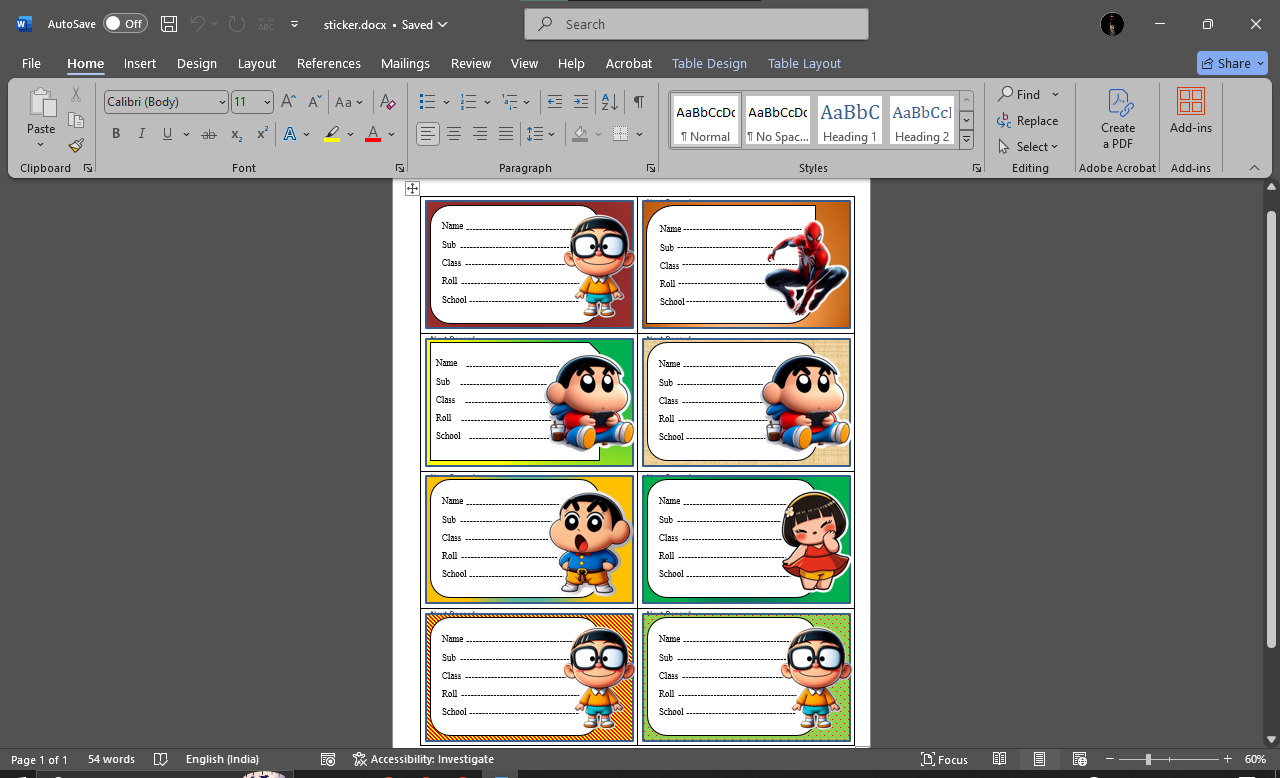
This project is a creative design task made using Microsoft Word, where attractive Name Slips are created for students. The project demonstrates how MS Word can be used not just for typing documents but also for graphic design and layout creation. Each slip includes fields like Name, Subject, Class, Roll, and School, designed with colorful borders and cartoon images to make them visually appealing for children.
What the Project Includes:
Creative Slip Designs – Multiple name slips designed with unique colors, patterns, and cartoon characters.
Student Information Fields – Sections for entering Name, Subject, Class, Roll, and School.
Use of Shapes and Text Boxes – Proper alignment and layout created using Word’s shape and text tools.
Image Insertion and Formatting – Cartoon and character images are inserted and positioned neatly beside each slip.
Video Demonstration – A video output is prepared to show how the full sheet of name slips looks after completion.
Skills Learned:
Designing with text boxes, borders, and shapes in MS Word.
Managing page layouts for multiple copies on one page.
Working with image alignment and formatting tools.
Enhancing presentation skills by converting design work into a video output.
Why This Project is Unique:
Turns a simple Word document into a colorful and practical design project.
Shows how MS Word can be used for creative design, not just typing.
Teaches students layout planning, design aesthetics, and printing setup.
The video presentation makes the project more interactive and engaging.
Final Result:
The result is a Name Slip Design Project in MS Word, where beautifully crafted slips with student details and cartoon images are displayed in a single printable sheet. It’s a perfect example of creativity using basic Word tools.
Project by : MRIGAKSHI BISWAS
Qualification : Class IX
Age : 15
Courses : E-Gyan, E-Gyan(L-2), E-Gyan(L-3)