Daybook by Ms Excel
Project : Daybook
Project Thumbnail
Project Video
📘 What is Excel?
Microsoft Excel is a spreadsheet application used to organize, analyze, and visualize data. It works with rows and columns to store data, perform calculations, and create charts.
🧩 Excel Interface Basics
Workbook: The entire Excel file.
Worksheet: A single tab inside the workbook (like “Sheet1”).
Cell: A box where a row and column intersect (like A1, B2).
Column: Vertical (labeled A, B, C…).
Row: Horizontal (labeled 1, 2, 3…).
✍️ Entering Data
Click a cell and start typing to enter text, numbers, or dates.
Press Enter to go to the next row or Tab to move to the next column.
➕ Basic Formulas & Functions
Formulas always start with =.
Common Formulas:
Purpose Formula Example Description
Add =A1 + B1 Adds values in A1 and B1
Subtract =A1 – B1 Subtracts B1 from A1
Multiply =A1 * B1 Multiplies A1 and B1
Divide =A1 / B1 Divides A1 by B1
Common Functions:
Function Example Description
SUM =SUM(A1:A5) Adds all numbers from A1 to A5
AVERAGE =AVERAGE(B1:B5) Calculates average of B1 to B5
MAX =MAX(C1:C5) Finds the largest value
MIN =MIN(C1:C5) Finds the smallest value
🎨 Formatting Data
Bold/Italic/Underline: Use the toolbar.
Cell Color: Highlight cell > click Fill Color.
Number Format: Change to Currency, Date, Percentage, etc.
Merge Cells: Combine multiple cells into one.
📊 Creating Charts
Select data.
Go to Insert > Choose a chart type (e.g., Column, Line, Pie).
Excel creates a chart based on your data.
🔍 Sorting and Filtering
Sort: Arrange data in A-Z or Z-A order.
Filter: Show only data that meets certain criteria.
📌 Quick Tips
Use Ctrl + C to copy, Ctrl + V to paste.
Use Ctrl + Z to undo.
AutoFill: Drag the bottom corner of a cell to copy content or continue a sequence.
Save your file often!
About the Project:
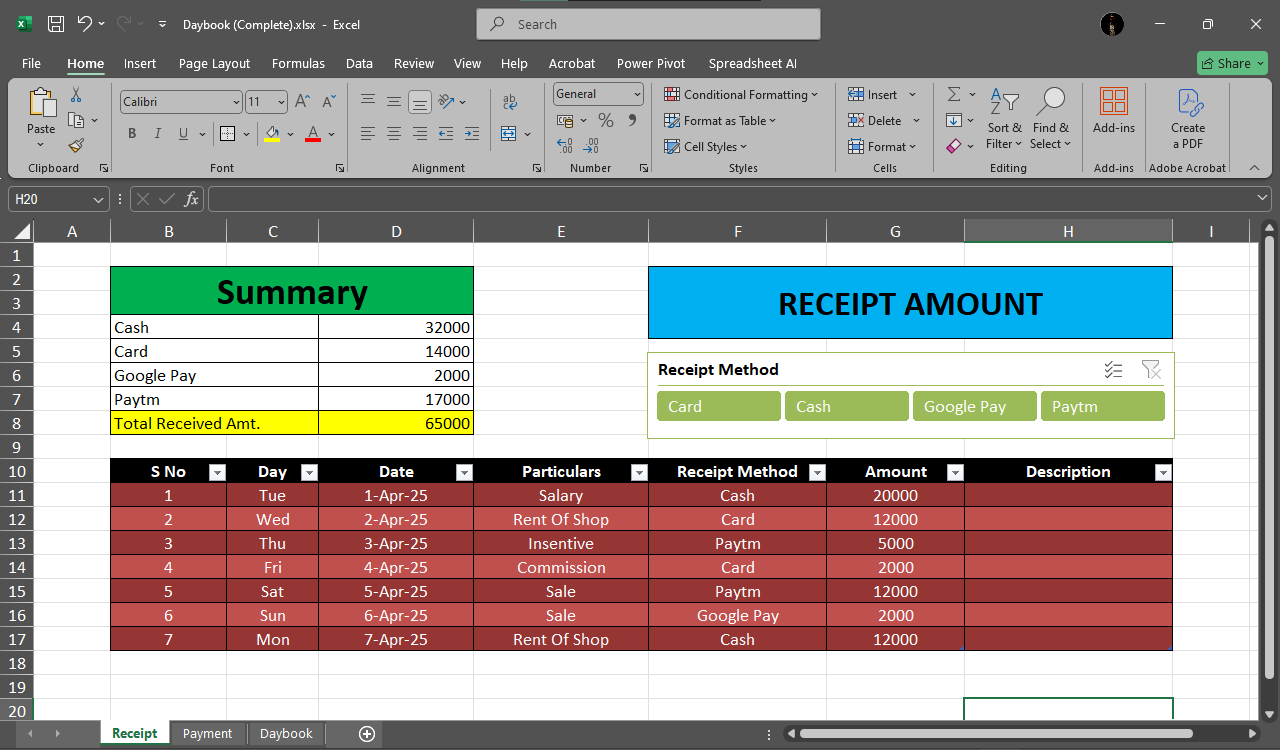
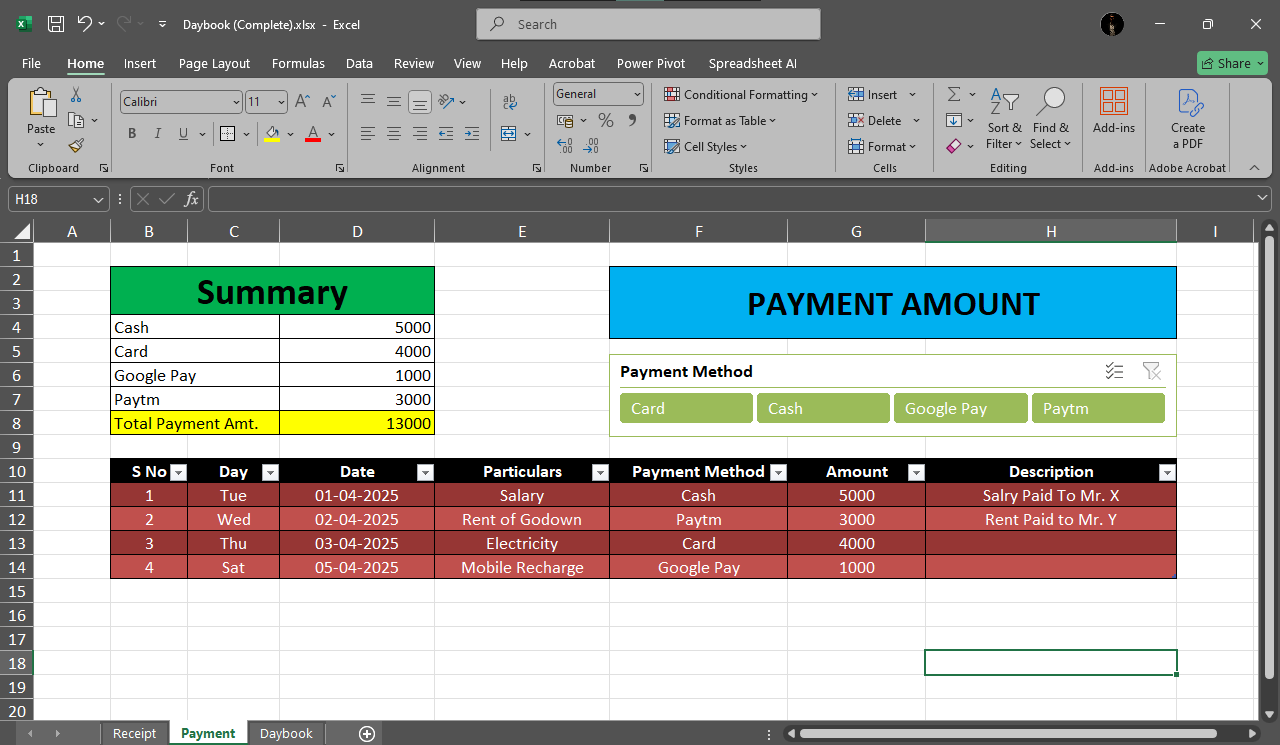
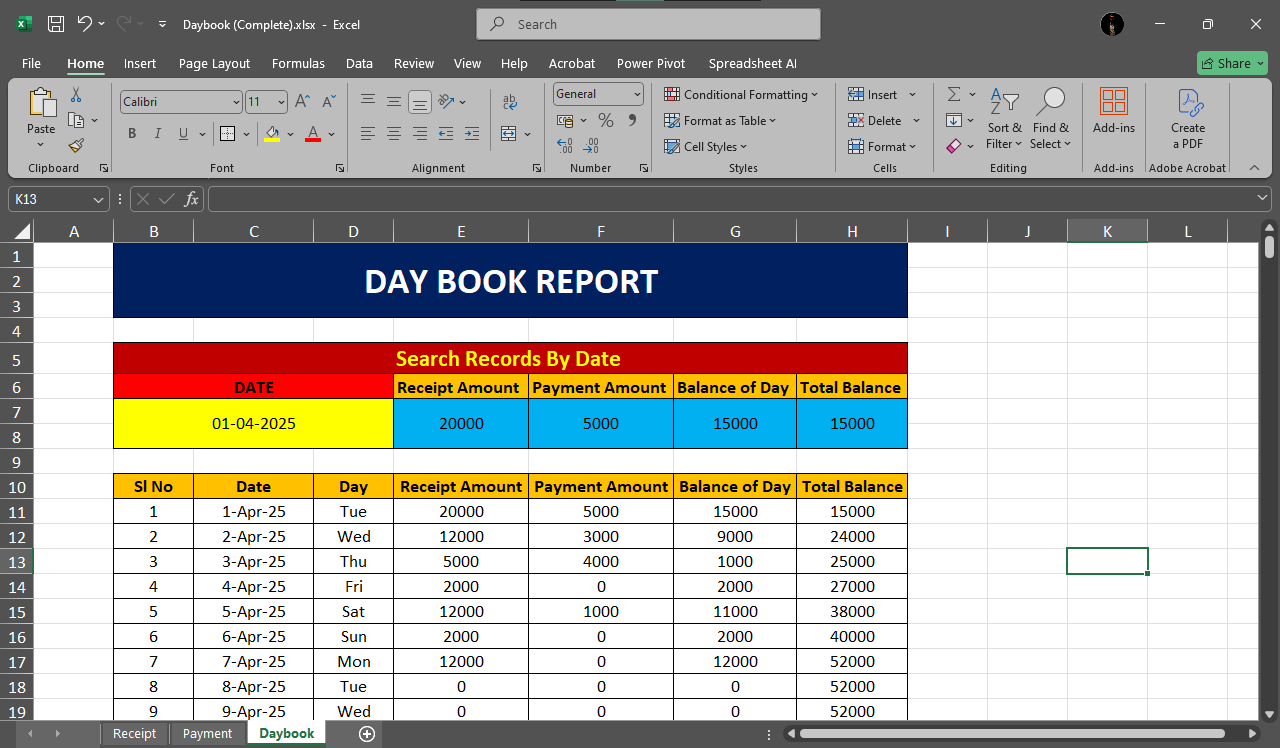
This project is a practical and educational Excel file designed to record daily business transactions in a structured and automated way. It demonstrates how Microsoft Excel can be used as a digital accounting tool for maintaining financial records. The Daybook records details like Date, Particulars, Voucher Type, Debit, Credit, and Balance, all organized neatly for easy tracking. The project is also presented as a video output, showing how the Excel sheet works dynamically and updates automatically.
What the Project Includes:
Daily Transaction Records – Each day’s entries include details such as Date, Description, Debit, Credit, and Balance.
Automated Calculations – Excel formulas are used to calculate totals and running balances automatically.
Clean and Professional Layout – Well-structured columns and formatted tables make the sheet easy to read and use.
Data Entry with Accuracy – Proper use of cell formatting, number alignment, and conditional formatting ensures accuracy.
Video Demonstration – A full video output shows how the daybook works and updates in real-time.
Skills Learned:
Using Excel formulas like SUM, IF, and running balance calculations.
Structuring data for accounting and bookkeeping purposes.
Formatting cells, tables, and layouts professionally.
Presenting financial data in a clear, understandable way.
Creating and showcasing Excel projects as video outputs.
Why This Project is Unique:
Combines Excel skills with real-world financial record keeping.
Helps students understand basic accounting concepts through Excel.
Shows how Excel can replace manual registers with automated sheets.
The video demonstration adds visual clarity and professional presentation.
Final Result:
The result is a fully functional Daybook in MS Excel, capable of recording and managing daily debit-credit transactions efficiently. It serves as a perfect example of how Excel can be used in business management and accounting, while also improving data handling and automation skills.
Project by : SOHAM DUTTA
Qualification : Class XII
Age : 18
Courses : ADIT, DIT+