Webpage Creation using HTML & CSS
Project : Webpage Creation
Project Thumbnail
Project Video
📘 What is HTML?
HTML (HyperText Markup Language) is the standard language used to create the structure of web pages. It defines elements like headings, paragraphs, links, images, and more.
🧩 HTML Basics
Tag: Defines an element. Example:
<p>Hello</p>Element: The complete set of start tag, content, and end tag.
Attributes: Extra info inside a tag. Example:
<img src="image.jpg" alt="photo">Common Tags:
<h1> to <h6>: Headings<p>: Paragraph<a href="url">: Link<img src="...">: Image<ul>, <ol>, <li>: Lists<table>: Table
✍️ Basic HTML Page Structure
<!DOCTYPE html>
<html>
<head>
  <title>My First Page</title>
</head>
<body>
  <h1>Hello World</h1>
  <p>This is my first HTML page.</p>
</body>
</html>
🎨 What is CSS?
CSS (Cascading Style Sheets) is used to style and design HTML pages. It controls colors, fonts, layouts, spacing, and more.
🧩 CSS Basics
Syntax:
selector {property: value;
}Selectors: Target HTML elements.
p { color: blue; }→ Makes all paragraphs blue.#id { }→ Targets a specific element by ID..class { }→ Targets elements with a class name.
✍️ Ways to Add CSS
Inline CSS – Inside an element.
<p style="color:red;">This is red text</p>Internal CSS – Inside
<style>in<head>.<style>
body { background-color: lightyellow; }
</style>External CSS – In a separate
.cssfile.<link rel="stylesheet" href="style.css">
📌 Common CSS Properties
| Purpose | Example | Description |
|---|---|---|
| Text Color | color: green; | Changes text color |
| Background | background-color: lightblue; | Sets background color |
| Font Size | font-size: 20px; | Adjusts text size |
| Text Align | text-align: center; | Centers text |
| Padding | padding: 10px; | Space inside an element |
| Margin | margin: 15px; | Space outside an element |
| Border | border: 1px solid black; | Adds border |
📊 Basic HTML + CSS Example
<!DOCTYPE html>
<html>
<head>
  <title>Styled Page</title>
  <style>
    body { background-color: #f0f8ff; font-family: Arial; }
    h1 { color: darkblue; text-align: center; }
    p { color: gray; font-size: 18px; }
  </style>
</head>
<body>
  <h1>Welcome to My Website</h1>
  <p>This page is styled using CSS.</p>
</body>
</html>
About the Project:
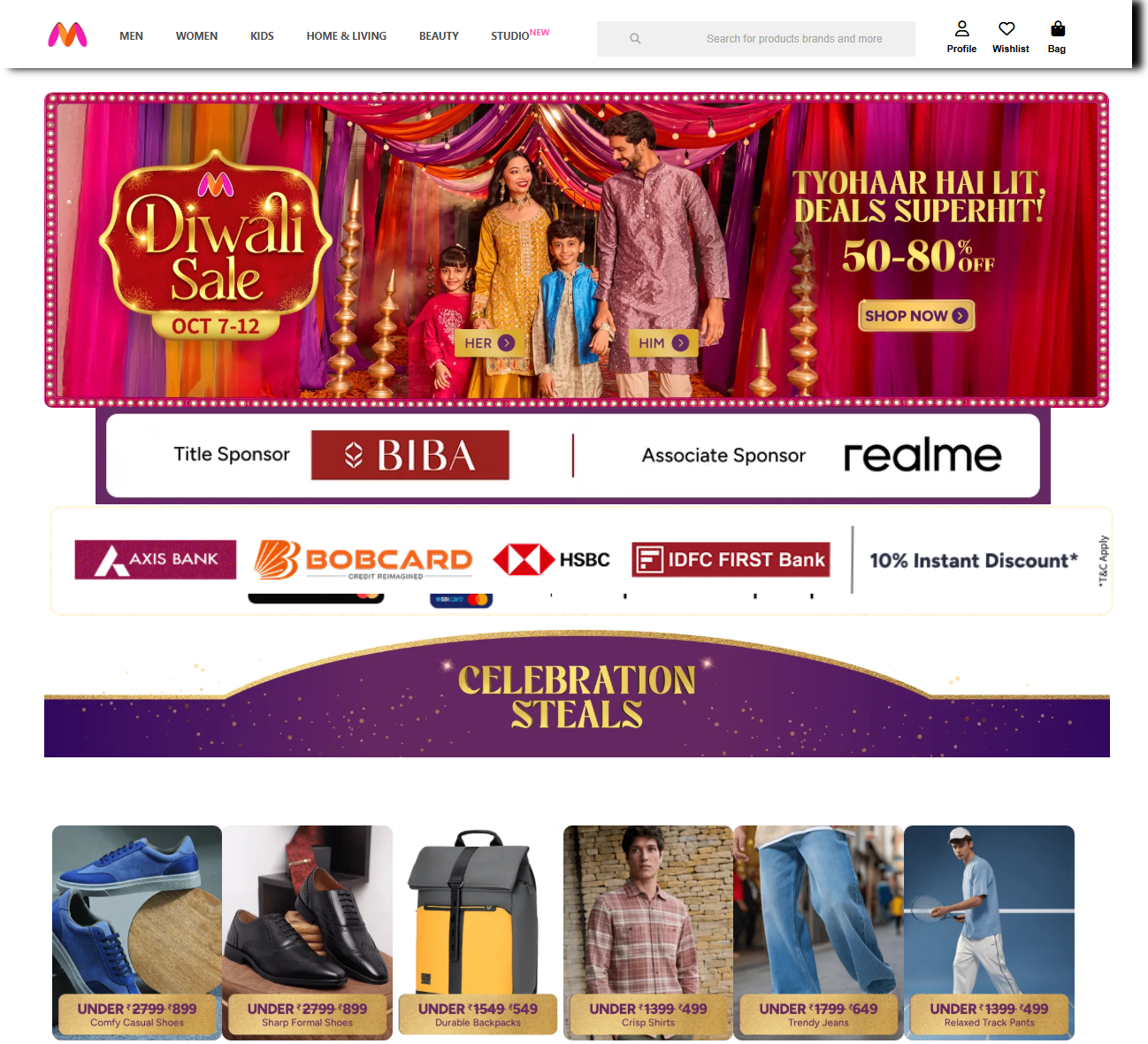
This project is a creative web design experiment made using HTML and CSS, showcasing how front-end web technologies can be used to build a modern, stylish webpage. The design is inspired by the Myntra online shopping interface, focusing on layout structure, navigation, and visual presentation. The project also includes a video output, allowing viewers to see how the webpage looks and behaves in real-time.
What the Project Includes:
Complete Webpage Layout – Built using HTML for structure and CSS for styling, the webpage includes headers, navigation bars, images, and product sections.
Navigation Menu Design – An interactive top bar similar to real e-commerce websites with sections like Men, Women, Kids, Home & Living, and Beauty.
Image-Based Sections – Multiple image banners and product grids are displayed using CSS positioning and layout techniques.
Font Awesome Integration – Icons such as Profile, Wishlist, and Bag are added to make the page more realistic and user-friendly.
Video Demonstration – The final output has been converted into a video format, showing the full webpage interface and design features.
Skills Learned:
Writing clean HTML code for webpage structure.
Styling webpages using CSS selectors, positioning, and layout properties.
Adding visual effects and responsive design elements.
Using external icon libraries (Font Awesome).
Presenting web projects through video for better demonstration.
Why This Project is Unique:
Turns coding knowledge into a real, visually rich web design.
Gives students practical experience in building a webpage from scratch.
Helps learners understand the connection between HTML structure and CSS design.
The video output makes it easy to share and display the project visually.
Final Result:
The result is a stylish and professional-looking webpage, built entirely with HTML and CSS, where viewers can explore the design layout, image sections, and menu bar—just like a real e-commerce website. The video demonstration brings the project to life, showing how all elements combine into a complete webpage experience.
Project by : ANISH GUIN
Qualification : Class X
Age : 16
Courses : E-Gyan, E-Gyan(L-2), E-Gyan(L-3)